
Best OpenClaw Hosting: VPS, Managed VPS, or Done-for-You?
Compare the three real ways to host OpenClaw: self-managed VPS, semi-managed providers, and fully managed services, with cost and security tradeoffs.

Jean-Elie Lecuy
|Founder of ClawRapid
SaaS builder writing about OpenClaw, AI agents, and agentic coding, with one goal: make powerful tooling actually usable.
Most OpenClaw hosting roundups treat the problem like a generic Node app on a cheap VPS. That misses what makes this decision different. An always-on agent stores secrets, touches external tools, runs scheduled jobs, and can create surprise model spend if the setup is sloppy.
So this page is not just a list of hosts. It compares the three operating models that matter in practice: self-managed VPS, semi-managed OpenClaw hosting, and fully managed service. The right choice depends less on brand preference and more on how much operational risk, maintenance, and troubleshooting you are willing to own.
What Is OpenClaw and Why Does Hosting Matter?
OpenClaw is an open-source AI assistant that connects to messaging platforms like Telegram, WhatsApp, Slack, and Discord. Unlike simple chatbots, it's an agentic AI - it takes actions on your behalf: managing calendars, sending emails, browsing the web, and running custom "skills."
But here's what makes hosting critical: OpenClaw needs to run 24/7 to be useful. It sends proactive notifications, monitors tasks through scheduled heartbeats, and maintains persistent memory across conversations. If your server goes down at 3 AM, your assistant goes dark - and so do all your automations.
The hosting choice determines three things:
- Reliability - Will your assistant be available when your customers need it?
- Security - Are your API keys, business data, and customer conversations protected?
- Cost - What's the real monthly bill once you add everything up?
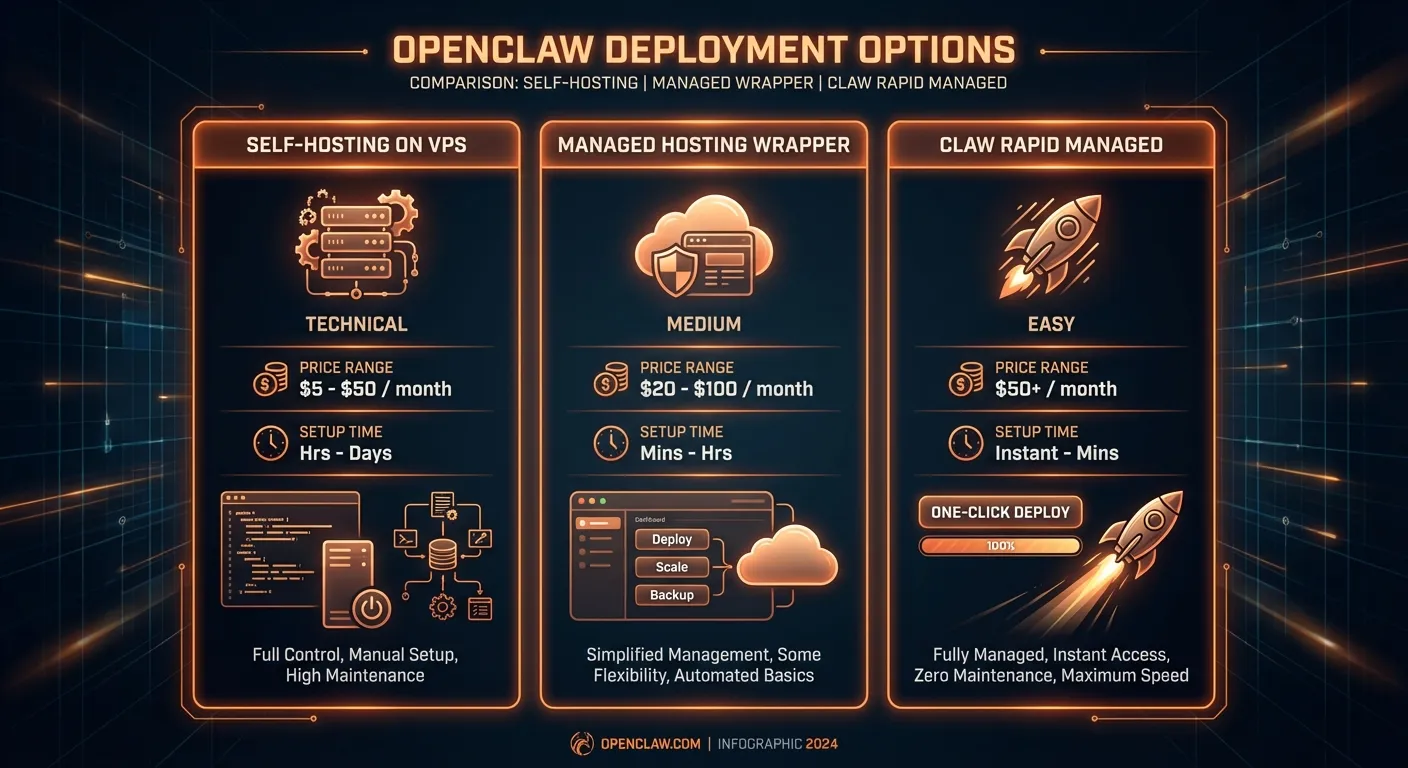
The Three Paths to OpenClaw Hosting
Path 1: Self-Hosting on a VPS
You rent a virtual private server (Hetzner, DigitalOcean, Vultr, etc.), install Docker, clone the OpenClaw repo, configure environment variables, set up SSL, create Telegram bot tokens, and manage everything yourself.
Who it's for: Developers and tinkerers who want full control.
Typical providers: Hetzner (from $4/mo), Hostinger ($4.99/mo), DigitalOcean ($6/mo), Vultr ($6/mo), Contabo ($5/mo).
Path 2: Managed VPS Hosting
A provider like xCloud deploys OpenClaw on a VPS for you with a one-click installer. You still have a server, but the initial setup is automated.
Who it's for: Semi-technical users who want an easier start but don't mind occasional maintenance.
Typical providers: xCloud ($24/mo), Hostinger with Docker template.
Path 3: Fully Managed Service
You don't touch a server at all. A service handles deployment, updates, security, channel integration, and support. You just configure your assistant and start chatting.
Who it's for: Business owners, solopreneurs, coaches, and anyone who'd rather spend time on their business than on DevOps.
Examples: ClawRapid ($45/mo) - deploy a personalized AI assistant on Telegram in 60 seconds, with human support and automatic updates.
The Real Cost of OpenClaw Hosting (Most Articles Get This Wrong)
Every comparison article lists VPS prices: "$5/month! $3.79/month!" But that's the server cost alone. Running OpenClaw involves at least four cost layers that most guides conveniently ignore.
Cost Layer 1: The VPS Server
This is the number everyone quotes. A basic VPS with 2 GB RAM and 1 vCPU runs $4–8/month depending on the provider. OpenClaw recommends at least 2 GB RAM for comfortable operation.
Cost Layer 2: LLM API Costs
OpenClaw needs an AI model to function. The most popular choices:
- Claude (Anthropic): ~$3 per million input tokens, ~$15 per million output tokens (Claude Sonnet 4.6)
- GPT (OpenAI): ~$2.50 per million input tokens, ~$10 per million output tokens
- Local models (Ollama): Free, but require a GPU-equipped server ($20–80/month) and produce significantly lower quality
For a moderately active personal assistant (50–100 messages per day), expect $15–40/month in API costs alone. Business use with customer interactions can easily reach $50–100/month.
The "API Wallet Assassin" problem: OpenClaw's agentic nature means it can enter runaway loops - a skill that triggers another skill that triggers another. Community members have reported overnight API bills of $100–500 from a single malfunctioning automation. Without spending limits (which you have to configure yourself), this is a real risk.
Cost Layer 3: Your Time
This is the cost nobody talks about. Self-hosting OpenClaw requires:
- Initial setup: 2–6 hours (Docker, environment variables, SSL, Telegram bot creation, firewall rules)
- Ongoing maintenance: 2–4 hours/month (updates, debugging, monitoring, backups)
- Troubleshooting: Variable - community forums are helpful but you're on your own for production issues
If your time is worth $55/hour (conservative for a business owner), that's $100–500 in setup costs and $100–200/month in maintenance time.
Cost Layer 4: Risk and Downtime
When your VPS goes down, your assistant stops. When an update breaks something, you diagnose it. When a security vulnerability is discovered, you patch it (more on this below).
The Real Monthly Cost Comparison
| Cost Component | Self-Hosted VPS | Managed VPS (xCloud) | Fully Managed (ClawRapid) |
|---|---|---|---|
| Server | $4–8/mo | $24/mo | Included |
| LLM API | $15–40/mo | $15–40/mo | $15 credit included |
| SSL/Domain | $0–10/mo | Included | Included |
| Your maintenance time | $100–200/mo | $50–100/mo | $0 |
| Realistic total | $120–260/mo | $90–165/mo | From $45/mo |
The "cheapest" option is actually the most expensive when you count your time. And that's before factoring in security risks.
The Security Problem Nobody's Talking About

This is where our analysis diverges from every other "best OpenClaw hosting" article. Most comparisons focus on uptime and pricing. But OpenClaw has serious security considerations that affect every self-hosted deployment.
API Key Storage
OpenClaw stores API keys (Anthropic, OpenAI, Google, etc.) in ~/.openclaw/openclaw.json on the server. On a self-hosted VPS:
- These keys are stored in plaintext on disk
- Anyone with SSH access to your server can read them
- A compromised server means all your API keys are compromised
- There's no built-in secret management (no Vault, no encrypted storage)
For business users, this means your OpenAI API key - potentially with a $500 spending limit - sits in a text file on a $5/month server. If that server is compromised, the attacker has your API keys.
Malicious Skills: The Plugin Problem
OpenClaw's ClawHub marketplace hosts hundreds of community-contributed skills. While the community is generally trustworthy, skills run with the same permissions as the OpenClaw process itself. A malicious or compromised skill can:
- Read all your environment variables (including API keys)
- Access your file system
- Execute arbitrary commands on your server
- Exfiltrate data through outbound network requests
OpenClaw includes Docker-based sandboxing with multiple modes (off, non-main, all) and tool policy controls. However, you should still review skills before installing them, as misconfigured sandboxing can leave your server exposed.
What This Means for Your Business
If you're a coach storing client conversations, a real estate agent handling property inquiries, or a freelancer managing project communications through OpenClaw - your data is only as secure as your hosting setup.
Self-hosting means you are responsible for:
- Keeping OpenClaw updated (within hours of security patches)
- Configuring firewalls correctly
- Rotating API keys regularly
- Auditing every skill you install
- Monitoring for unusual activity
Managed services handle these responsibilities for you. ClawRapid, for example, runs each customer's assistant in an isolated environment, applies security patches automatically, rotates credentials, and doesn't expose the underlying infrastructure to the user.
Detailed Provider Comparison
Best VPS Providers for Self-Hosting OpenClaw
Hetzner - Best for European Privacy-Conscious Users
- Starting at: $4/month (CX22: 2 vCPU, 4 GB RAM)
- Data centers: Germany, Finland (GDPR-compliant)
- OpenClaw setup: Manual (Docker + docker-compose)
- Pros: Cheapest European option, excellent performance, ISO 27001 certified
- Cons: No one-click installer, requires Docker/Linux knowledge, no managed OpenClaw support
Hetzner is the go-to recommendation in the OpenClaw community, and for good reason: German data centers, great pricing, and solid performance. But you need to be comfortable with terminal commands, Docker configuration, and manual SSL setup.
DigitalOcean - Best Documentation and Developer Experience
- Starting at: $6/month (Basic Droplet: 1 vCPU, 1 GB RAM) - recommend $12/mo for 2 GB RAM
- Data centers: Global (US, EU, Asia, Australia)
- OpenClaw setup: One-click Droplet image available
- Pros: Excellent documentation, one-click deploy, large community, familiar interface
- Cons: More expensive than Hetzner for equivalent specs, API costs still separate
DigitalOcean's one-click OpenClaw image removes the Docker setup hassle, but you still need to configure environment variables, Telegram bot tokens, and SSL certificates. Their documentation is best-in-class for developers.
Vultr - Best for Global Deployment
- Starting at: $6/month (Cloud Compute: 1 vCPU, 1 GB RAM)
- Data centers: 32 locations worldwide
- OpenClaw setup: Manual or marketplace image
- Pros: Most locations, hourly billing, good GPU options for local models
- Cons: Interface less beginner-friendly, no managed OpenClaw option
Hostinger - Best Budget Option
- Starting at: $4.99/month (KVM 1: 1 vCPU, 4 GB RAM)
- Data centers: US, EU, Asia, South America
- OpenClaw setup: One-click Docker template
- Pros: Generous RAM for the price, 1-click Docker template, 24/7 support
- Cons: Not OpenClaw-specific, you handle updates and security yourself
Managed Hosting Options
xCloud - Best Managed VPS for OpenClaw
- Starting at: $24/month (all-inclusive server)
- Setup time: Under 60 seconds
- Includes: Pre-configured Telegram/WhatsApp, automatic updates, managed infrastructure
- Cons: API costs still separate, less flexibility than raw VPS, limited customization
xCloud is the only provider offering truly managed OpenClaw VPS hosting. The setup is genuinely fast, and they handle server maintenance. However, you still pay for LLM API usage separately, and advanced customization is limited compared to self-hosting.
ClawRapid - Best Fully Managed Service for Non-Developers
- Price: $45/month
- Setup time: 60 seconds
- Includes: Server, $15/mo LLM API credit, Telegram integration, custom personality, security updates, human support
- Target audience: Solopreneurs, coaches, real estate agents, small businesses
ClawRapid takes a different approach: instead of hosting OpenClaw for you, it provides a complete AI assistant service built on OpenClaw's technology. You don't configure Docker, manage API keys, or worry about updates. You describe your business, and ClawRapid deploys a personalized assistant that's ready to handle customer interactions on Telegram.
The key difference: $15 of LLM API credit is included in the $45/month pricing, which covers moderate daily usage. If you need more, additional usage is billed transparently. No wallet assassin problem, no separate OpenAI invoice to manage.
For the target audience - busy professionals who want AI automation without becoming system administrators - this is often the most economical option despite the higher sticker price.
Self-Hosting OpenClaw: Step-by-Step Setup Guide
If you decide self-hosting is right for you, here's what the process actually looks like:
Prerequisites
- A VPS with at least 2 GB RAM and 1 vCPU (Ubuntu 22.04+ recommended)
- SSH access to your server
- A domain name (optional but recommended for SSL)
- An Anthropic or OpenAI API key
- A Telegram bot token (from @BotFather)
Basic Setup Steps
- SSH into your server and update packages
- Install Docker and Docker Compose (if not pre-installed)
- Clone the OpenClaw repository from GitHub
- Configure environment variables in
.env- this includes your API keys, Telegram token, model selection, memory settings, and skill configuration - Run
docker-compose up -dto start the containers - Configure SSL with Let's Encrypt (if using a domain)
- Set up firewall rules - critically important for any internet-facing instance
- Test your Telegram bot by sending a message
- Configure skills - install only from trusted sources
- Set up monitoring - uptime checks, log rotation, backup scripts
Realistic time: 2–6 hours for someone comfortable with Linux. Significantly longer for beginners - and that's assuming nothing goes wrong.
Post-Setup Maintenance Checklist
- Check for OpenClaw updates weekly
- Monitor API spending daily (set alerts)
- Review server logs for unusual activity
- Backup configuration and memory data
- Rotate API keys quarterly
- Test disaster recovery (can you restore from backup?)
If this list feels overwhelming, that's a signal that a managed service might be the better fit. There's no shame in choosing the path that lets you focus on your actual business.
Who Should Self-Host vs. Use a Managed Service?
Self-Host If You:
- Are a developer or sysadmin comfortable with Docker and Linux
- Want full control over your data and infrastructure
- Need custom skills that require server-level access
- Enjoy tinkering and don't mind maintenance overhead
- Have a specific compliance requirement that demands on-premise hosting
Use a Managed Service If You:
- Are a business owner, coach, consultant, or freelancer
- Value your time at more than the cost difference
- Want your AI assistant to "just work" without technical overhead
- Need reliable uptime for customer-facing interactions
- Don't want to manage API keys, security patches, and Docker updates
- Want predictable monthly costs with no surprise API bills
For most non-technical users, the managed path saves both money and stress. As one OpenClaw community member put it: "I spent a weekend setting up self-hosted OpenClaw. It was fun. Then I spent every other weekend fixing it."
How ClawRapid Compares to DIY OpenClaw
| Feature | DIY OpenClaw | ClawRapid |
|---|---|---|
| Setup time | 2–6 hours | 60 seconds |
| Technical skill needed | Docker, Linux, networking | None |
| Monthly cost (realistic) | $120–260 | $45 |
| API costs | Separate, variable | $15/mo credit included |
| Security updates | Manual | Automatic |
| Uptime monitoring | You set it up | Built-in |
| Customer support | Community forums | Human support team |
| Telegram integration | Manual bot setup | Pre-configured |
| Custom personality | You write the prompts | Guided setup |
| Runaway cost protection | DIY spending limits | Built-in safeguards |
ClawRapid isn't the right choice for everyone. If you're a developer who wants to hack on skills and customize every aspect of your assistant, self-hosting gives you that freedom. But if you're a business owner looking for the best AI chatbot, the managed path eliminates an entire category of problems.
Frequently Asked Questions
What are the minimum system requirements for OpenClaw?
OpenClaw requires at least 1 vCPU and 2 GB RAM for comfortable operation. The OpenClaw process uses about 500 MB–1 GB RAM at idle. For production use with multiple skills and active conversations, 4 GB RAM is recommended. Storage needs are minimal - about 1 GB for the base installation plus whatever your memory and skill data accumulates.
Can I host OpenClaw for free?
Technically, you can run OpenClaw on a free-tier cloud instance (Oracle Cloud Free Tier, for example). However, free tiers typically have 1 GB RAM, which is tight. More importantly, you still need to pay for LLM API usage - there's no way around this cost unless you run a local model, which requires significantly more powerful (and expensive) hardware. The "free hosting" option usually costs $15–40/month in API fees alone.
Is OpenClaw GDPR compliant?
OpenClaw itself is open-source software - GDPR compliance depends on how and where you host it. If you use a European provider like Hetzner (German data centers), your data stays in the EU. However, conversations are sent to LLM providers (Anthropic, OpenAI) for processing, which may involve US servers. For strict GDPR compliance, you'd need to run a local model - which adds significant cost and reduces quality. ClawRapid handles GDPR considerations as part of its managed service, with European infrastructure.
How do I protect against runaway API costs?
Set spending limits directly with your LLM provider (OpenAI and Anthropic both support monthly caps). In OpenClaw's configuration, you can also set per-message token limits and disable recursive skill execution. Monitor your API dashboard daily during the first week. Some managed services, including ClawRapid, include built-in cost safeguards that prevent runaway loops from generating unexpected bills.
Can I use OpenClaw with WhatsApp?
Yes, OpenClaw supports WhatsApp through the Baileys library with QR code pairing. You scan a QR code from your personal WhatsApp (similar to WhatsApp Web), and the connection is established. No Meta Business account or API approval is needed. Self-hosted WhatsApp integration takes about 10-15 minutes to configure. Managed services like ClawRapid include pre-configured WhatsApp support.
What happens if my self-hosted OpenClaw goes down?
Your assistant becomes completely unresponsive. Scheduled heartbeats stop, proactive notifications cease, and any customer-facing automations go offline. There's no built-in failover or redundancy in the default OpenClaw setup. You'll need to SSH into your server, diagnose the issue, and restart the containers. For business-critical use cases, this is the strongest argument for managed hosting with SLA-backed uptime guarantees.
Is ClawRapid the same as self-hosted OpenClaw?
ClawRapid is built on OpenClaw's technology but provides a complete managed experience. You get the same AI capabilities - Telegram integration, persistent memory, proactive notifications, custom skills - without managing the infrastructure. The trade-off is less low-level control: you can't SSH into the server or install arbitrary skills. For automating customer service and business workflows, ClawRapid provides everything most non-technical users need.
How often does OpenClaw need to be updated?
The OpenClaw project releases updates frequently - sometimes multiple times per week during active development. Security patches require immediate attention. Feature updates can be applied at your convenience, but falling too far behind makes future updates more difficult. Self-hosting means manually pulling updates and restarting containers. Managed services apply updates automatically.
Final Verdict: Which OpenClaw Hosting Is Best for You?
There's no universal "best" - it depends on who you are:
- Developers who enjoy DevOps: Self-host on Hetzner or DigitalOcean. Budget $120–260/month realistically, and stay on top of security updates.
- Semi-technical users who want a shortcut: xCloud's managed VPS at $24/month plus API costs is a solid middle ground.
- Business owners who want results, not infrastructure: ClawRapid at $45/month includes server, $15 AI credit, security, and support - and deploys in 60 seconds.
The OpenClaw ecosystem is still young and evolving fast. Security practices are improving, the skill marketplace is maturing, and hosting options will continue to expand. But right now, in February 2026, the safest and most cost-effective path for non-developers is a fully managed service that handles the complexity for you.
Ready to deploy your AI assistant without the DevOps headache? Try ClawRapid free for 7 days - 60-second setup, no credit card required, $15 LLM credit included.
Which agent do you want to deploy?
The battle-tested assistant, extensible with 16,000+ skills.
Which model do you want as default?
Low token prices with Max reasoning. You can also connect a ChatGPT subscription that includes this model.
You can switch anytime from your dashboard
Which channel do you want to use?
You can switch anytime from your dashboard
In 60 seconds, your AI agent is live.
Related articles
Best Hermes Agent Hosting: Self-Hosted VPS, Serverless, or Managed?
Compare the real ways to run Hermes Agent 24/7: DIY VPS, cloud VMs, serverless sandboxes, and managed hosting, with costs, security, and setup time.
OpenClaw vs Hermes Agent: Ecosystem or Self-Learning Agent?
Compare OpenClaw and Hermes Agent on channel reach, skill distribution, memory strategy, self-improving workflows, and deployment style.
OpenClaw vs nanobot: Bigger Platform or Lean Python Agent?
Compare OpenClaw and nanobot on Asian messaging coverage, codebase size, security model, ecosystem maturity, and production readiness.