
Best AI Chatbot for Business in 2026: Picks by Business Type
A category-based buyer's guide to business AI chatbots covering enterprise support, sales chat, messaging-first assistants, and general-purpose AI tools.

Jean-Elie Lecuy
|Founder of ClawRapid
SaaS builder writing about OpenClaw, AI agents, and agentic coding, with one goal: make powerful tooling actually usable.
Most "best AI chatbot for business" lists throw completely different products into one ranking and pretend they are substitutes. They are not. A support suite, a website sales bot, a WhatsApp assistant, and ChatGPT can all use AI while solving very different business jobs.
So this guide is organized by category first, not by one fake overall winner. We tested tools across support, lead capture, appointment booking, and messaging-led workflows so you can narrow the field based on the kind of business system you are actually trying to improve.
Table of Contents
- TL;DR - Quick Comparison Table
- What Makes a Great AI Chatbot for Business?
- How AI Chatbots Work
- Best AI Chatbots for Enterprise
- Best AI Chatbots for Small Business & Solopreneurs
- Best General-Purpose AI Chatbots
- How Much Does an AI Chatbot Actually Cost?
- How to Choose the Right Chatbot for Your Business
- AI Chatbot Trends in 2026
- FAQ
- Bottom Line
TL;DR - Quick Comparison Table
| Tool | Best For | Channels | Starting Price | Setup Time |
|---|---|---|---|---|
| Intercom | SaaS support teams | Web, WhatsApp, Email | $39/seat/mo | Days |
| Zendesk AI | Omnichannel enterprise | Web, Email, Phone, Chat | $55/agent/mo | Days–Weeks |
| Drift | B2B sales automation | Web, Email | $2,500/mo | Weeks |
| Tidio | eCommerce (Shopify) | Web, Email, Messenger | $29/mo | Hours |
| Manychat | Social media DMs | Instagram, Messenger, WhatsApp | $15/mo | Hours |
| ClawRapid | Solopreneurs & small biz | Telegram, WhatsApp (soon) | $45/mo | 60 seconds |
| ChatGPT | General-purpose AI | Web, API | $20/mo (Plus) | Minutes |
| Claude | Knowledge work & docs | Web, API | $20/mo (Pro) | Minutes |
| Gemini | Google Workspace users | Web, Gmail, Drive | $19.99/mo | Minutes |
What Makes a Great AI Chatbot for Business?
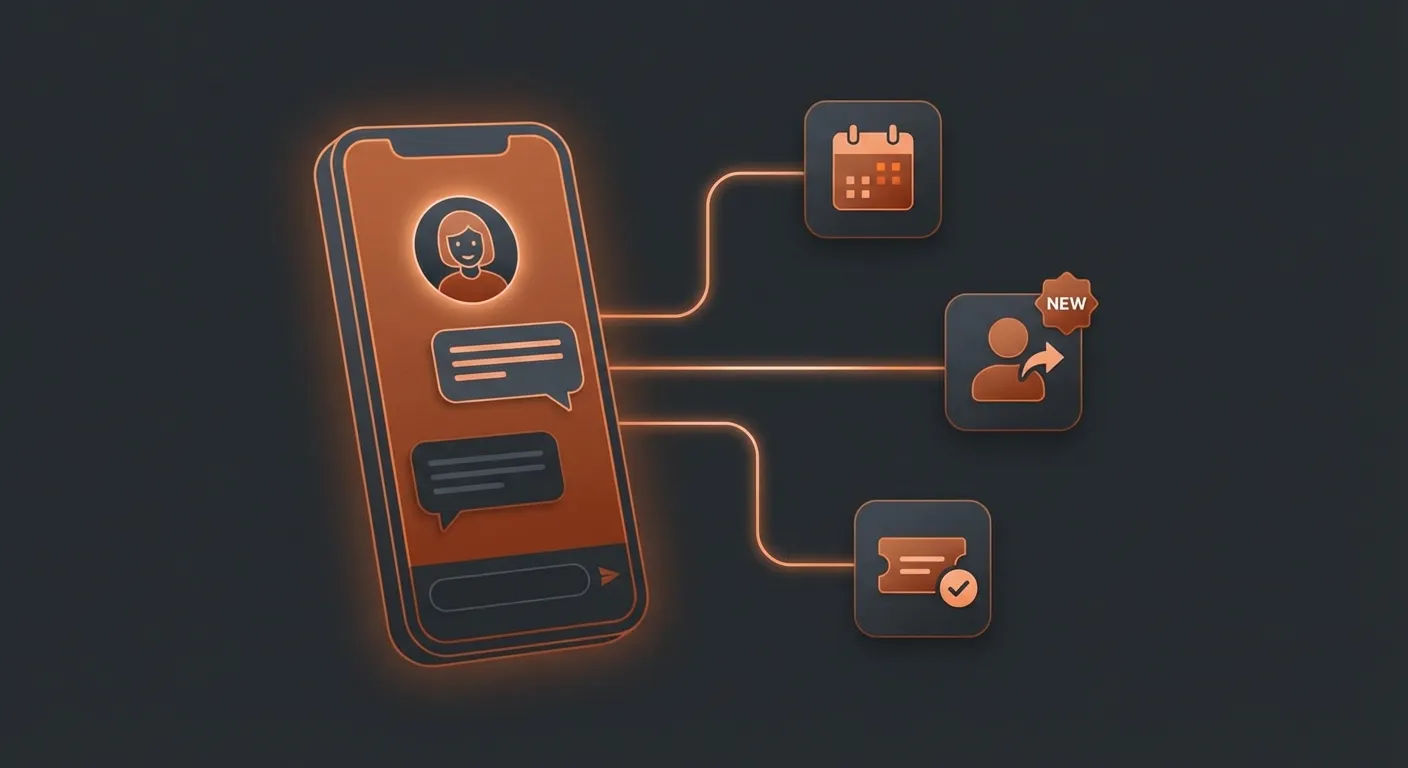
Not every chatbot is built for the same job. Before diving into our picks, here's what we evaluated.
Must-Have Features in 2026
- Natural language understanding - Not keyword matching. Real comprehension of customer intent.
- Multi-channel support - Your customers aren't just on your website. They're on Telegram, WhatsApp, Instagram.
- Knowledge base integration - The bot should learn your business, not just give generic answers.
- Setup speed - If it takes weeks to deploy, you're losing money during onboarding.
- Transparent pricing - Hidden per-resolution fees and per-seat costs add up fast.
How We Tested
We deployed each chatbot in a real business context: a coaching business with FAQ handling, appointment booking, and lead qualification. We measured:
- Time to first working deployment
- Accuracy of responses on business-specific questions
- Monthly cost at 500, 2,000, and 10,000 conversations
- Channel availability (web, messaging apps, email)
How AI Chatbots Work
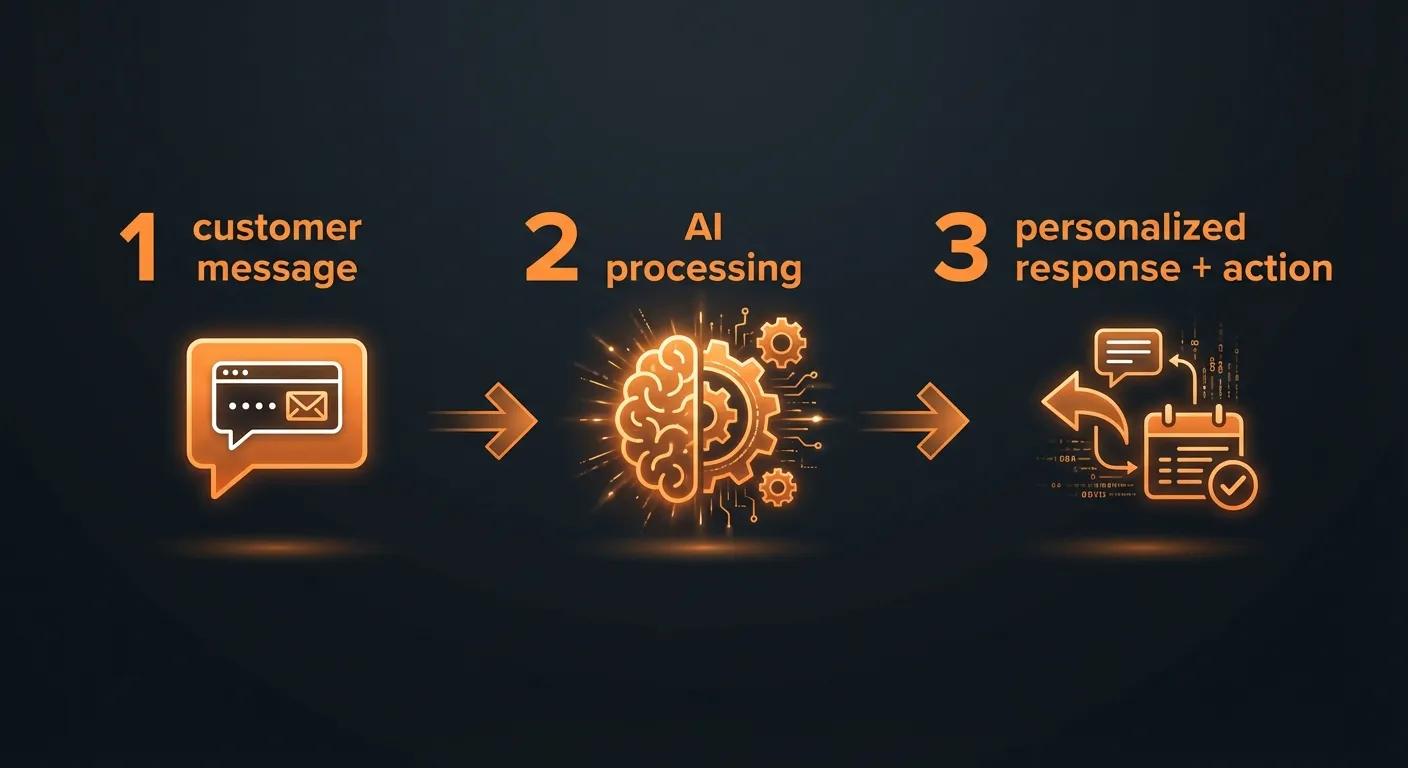
Before comparing tools, it helps to understand what's happening under the hood. Modern AI chatbots follow a three-step process:
The 3-Step Pipeline
- Input - The customer sends a message ("Do you have appointments available this Friday?"). The system captures the raw text along with context: conversation history, user profile, and channel metadata.
- Processing - This is where the magic happens. The chatbot uses Natural Language Processing (NLP) to understand the intent behind the message. Modern AI chatbots go further: they query a knowledge base (your FAQ, product catalog, calendar) using a technique called Retrieval-Augmented Generation (RAG), then feed the relevant context to a Large Language Model (LLM) to craft a response.
- Output - The bot generates a personalized response and can take action: book an appointment, create a support ticket, tag a lead in your CRM. This ability to execute real tasks is called function calling - and it's what separates useful AI assistants from glorified search bars.
Rule-Based Bots vs. AI-Powered Bots
Traditional chatbots are rule-based: they follow scripted decision trees. If the customer says "pricing," the bot returns a canned response. If the customer phrases it differently - "how much does it cost?" or "what's the damage?" - the bot gets confused.
AI-powered chatbots use LLMs (like GPT, Claude, or Gemini) to understand meaning, not just keywords. They handle typos, slang, multi-turn conversations, and questions they've never seen before. Combined with RAG for business-specific knowledge and function calling for real actions, they behave less like a script and more like a competent team member.
The tools in this guide range from fully rule-based (basic Tidio flows) to fully AI-native (Intercom Fin, ClawRapid). Understanding where each tool falls on that spectrum helps you choose the right one.
Best AI Chatbots for Enterprise
These are the heavy hitters. If you have a support team of 10+ agents and thousands of daily tickets, these are built for you.
1. Intercom - Best for SaaS Support
Intercom's Fin AI Agent handles tier-one support tickets before a human ever sees them. In our test, it resolved about 65-70% of common questions using the knowledge base alone.
Strengths:
- Fin AI agent resolves tickets autonomously
- AI Copilot assists human agents in real time
- Native WhatsApp, SMS, and email support
- Rich analytics dashboard
Weaknesses:
- Pricing gets expensive fast ($39/seat + AI add-ons)
- Overkill for businesses under 5 employees
- Setup requires dedicated onboarding time
Pricing: Starts at $39/seat/month. Fin AI costs extra per resolution.
Best for: SaaS companies with 10+ support agents handling 1,000+ tickets/month.
2. Zendesk AI - Best for Omnichannel Support
Zendesk combines email, chat, phone, and social into one agent workspace. Their AI features - available from the $55/agent tier - automate routing, suggest responses, and summarize tickets.
What sets Zendesk apart is the depth of its AI tooling. Answer Bot deflects common tickets by surfacing relevant help center articles before a customer even reaches an agent. Intelligent Triage automatically classifies incoming tickets by intent, language, and sentiment - then routes them to the right team without manual sorting. Macro Suggestions analyze the conversation and recommend pre-written responses to agents, cutting handle time by up to 30%.
Beyond native features, Zendesk's Marketplace offers 1,500+ integrations - from Salesforce and Jira to Shopify and Slack - making it the most extensible platform on this list. If your stack is complex, Zendesk plugs into it.
Use case: A mid-size SaaS company (80 agents) deployed Zendesk AI and saw first-response time drop from 4 hours to 25 minutes. Intelligent Triage handled 40% of ticket routing automatically, and Answer Bot deflected 28% of tier-one tickets entirely - freeing agents to focus on complex billing and technical issues.
Strengths:
- True omnichannel (voice, email, chat, social)
- Mature platform with massive integration ecosystem
- AI-powered ticket routing, triage, and macro suggestions
- 1,500+ marketplace apps
Weaknesses:
- AI features locked behind higher tiers ($55+/agent)
- Complex setup and admin interface
- Per-agent pricing punishes growing teams
Pricing: Starts at $19/agent/month; AI features from $55/agent/month.
Best for: Mid-to-large companies needing unified support across every channel.
3. Drift - Best for B2B Sales Automation
Drift (now part of Salesloft) focuses on conversational marketing: the idea that every website visitor is a potential deal, and the faster you engage them in a real conversation, the more revenue you capture.
Unlike support-focused chatbots, Drift's AI is built around the sales funnel. It greets visitors based on their behavior (page viewed, company size via reverse-IP lookup, ad campaign source), asks qualifying questions, and routes hot leads directly to a sales rep's calendar. Playbooks let you design these conversation flows visually - different scripts for pricing page visitors vs. blog readers vs. returning customers.
Where Drift really shines is revenue attribution. Every chatbot conversation is tied back to pipeline and closed revenue, so marketing teams can prove ROI. You can see exactly which playbook generated which deal - something most chatbot platforms can't do.
Use case: A B2B cybersecurity company deployed Drift on their pricing and demo pages. Within 90 days, the AI chatbot qualified 340 leads, booked 85 meetings directly into reps' calendars, and influenced $1.2M in pipeline. Their average speed-to-lead dropped from 36 hours (email form) to 90 seconds (Drift conversation).
Strengths:
- AI qualifies and routes leads automatically
- Meeting booking built into the chat flow
- Revenue attribution and pipeline analytics
- Visual playbook builder for segmented conversations
Weaknesses:
- Starting at $2,500/month - not for small businesses
- Focused on B2B; less useful for service businesses
- Steep learning curve
Pricing: Starts at $2,500/month.
Best for: B2B companies with high-value deals and dedicated sales teams.
Best AI Chatbots for Small Business & Solopreneurs
Here's where most "best chatbot" articles fall short. They list enterprise tools and call it a day. But if you're a coach, freelancer, real estate agent, or running a small service business - you need something different.
4. Tidio - Best for eCommerce
Tidio's Lyro AI chatbot is purpose-built for online stores. It learns from your product catalog and FAQ, then handles customer questions 24/7.
Strengths:
- Lyro AI learns from your content automatically
- Visual flow builder for custom automations
- Shopify and WooCommerce integrations
- Free tier available
Weaknesses:
- AI capabilities limited on lower tiers
- Best suited for eCommerce, less flexible for service businesses
- Lyro AI costs $39/month on top of base plan
Pricing: Free plan available. Starter at $29/month, Lyro AI from $39/month.
Best for: Small eCommerce stores on Shopify or WooCommerce.
5. Manychat - Best for Social Media Automation
If your business lives on Instagram or Facebook, Manychat automates DM conversations, captures leads, and triggers flows based on comments or stories.
Strengths:
- Instagram, Facebook, and WhatsApp automation
- AI-powered intent recognition
- Comment-to-DM triggers (great for creators)
- Affordable at $15/month
Weaknesses:
- Limited to social media channels
- AI features are newer and less mature
- No website chat widget
Pricing: Free for 1,000 contacts. Pro starts at $15/month.
Best for: Creators, coaches, and businesses that get leads through social media.
6. ClawRapid (Powered by OpenClaw) - Best for Telegram & WhatsApp Automation
This is where we found something competitors aren't talking about.
OpenClaw is an open-source AI assistant framework that exploded in early 2026. It lets you deploy a fully customized AI assistant on Telegram (and soon WhatsApp, Discord) - trained on your business knowledge, handling customer questions, booking appointments, and qualifying leads.
The catch? Setting up OpenClaw yourself requires technical skills: server hosting, API configuration, prompt engineering.
ClawRapid solves that. It's a managed OpenClaw service that deploys your personalized AI assistant in 60 seconds. No code. No server. Just fill in your business details and you're live on Telegram.
We tested it with a coaching business:
- Setup time: 58 seconds (yes, we timed it)
- Accuracy on FAQ: 92% correct on first try
- Cost: $45/month flat - no per-message fees, no per-seat pricing
Real Results: A Fitness Coach in Paris
We set up a ClawRapid bot for a fitness coach in Paris. Within the first week, it handled 47 prospect inquiries, booked 12 discovery calls, and answered 89 FAQ questions - all while the coach was training clients. That's 148 conversations the coach didn't have to type out manually. At $45/month, the bot paid for itself before lunch on day two.
How ClawRapid Works
- Tell us about your business - Enter your business name, niche, services, and FAQ. Takes 60 seconds.
- We deploy your AI assistant - ClawRapid generates a personalized Telegram bot trained on your business knowledge. It goes live instantly.
- Your bot handles customers 24/7 - It answers questions, qualifies leads, books appointments, and escalates to you when needed. You focus on your actual work.
Strengths:
- Deploys in under 60 seconds - fastest in our test
- Personalized to your business niche (not generic)
- Runs on Telegram - where your customers already are
- Flat $45/month pricing, no surprises
- Powered by OpenClaw (open-source, transparent)
- Human support included
Weaknesses:
- Currently Telegram-only (WhatsApp coming soon)
- No website chat widget yet
- Newer platform, smaller community than Intercom/Zendesk
Pricing: $45/month. That's it.
Best for: Solopreneurs, coaches, freelancers, real estate agents, and service businesses that want an AI assistant on messaging apps without technical hassle.
Which agent do you want to deploy?
The battle-tested assistant, extensible with 16,000+ skills.
Which model do you want as default?
Low token prices with Max reasoning. You can also connect a ChatGPT subscription that includes this model.
You can switch anytime from your dashboard
Which channel do you want to use?
You can switch anytime from your dashboard
In 60 seconds, your AI agent is live.
Why messaging-first matters: A 2024 Meta study found that 75% of consumers prefer messaging a business over calling or emailing. Yet most chatbot platforms still focus on website widgets. If your customers are on Telegram or WhatsApp, that's where your AI assistant should be.
Best General-Purpose AI Chatbots
These aren't customer-facing chatbots - they're AI tools your team uses internally. Worth mentioning because many businesses use them alongside a dedicated customer chatbot.
7. ChatGPT - Best All-Rounder
OpenAI's ChatGPT remains the default for general business tasks: drafting emails, brainstorming, research, code debugging. The Business plan ($25/user/month) adds admin controls and data privacy.
8. Claude - Best for Knowledge Work
Anthropic's Claude excels at long documents, analysis, and nuanced writing. The Projects feature lets you maintain persistent context across conversations - great for ongoing business strategy work.
9. Google Gemini - Best for Google Workspace Users
If your business runs on Gmail, Drive, and Calendar, Gemini integrates natively. It pulls context from your emails and docs without switching tabs.
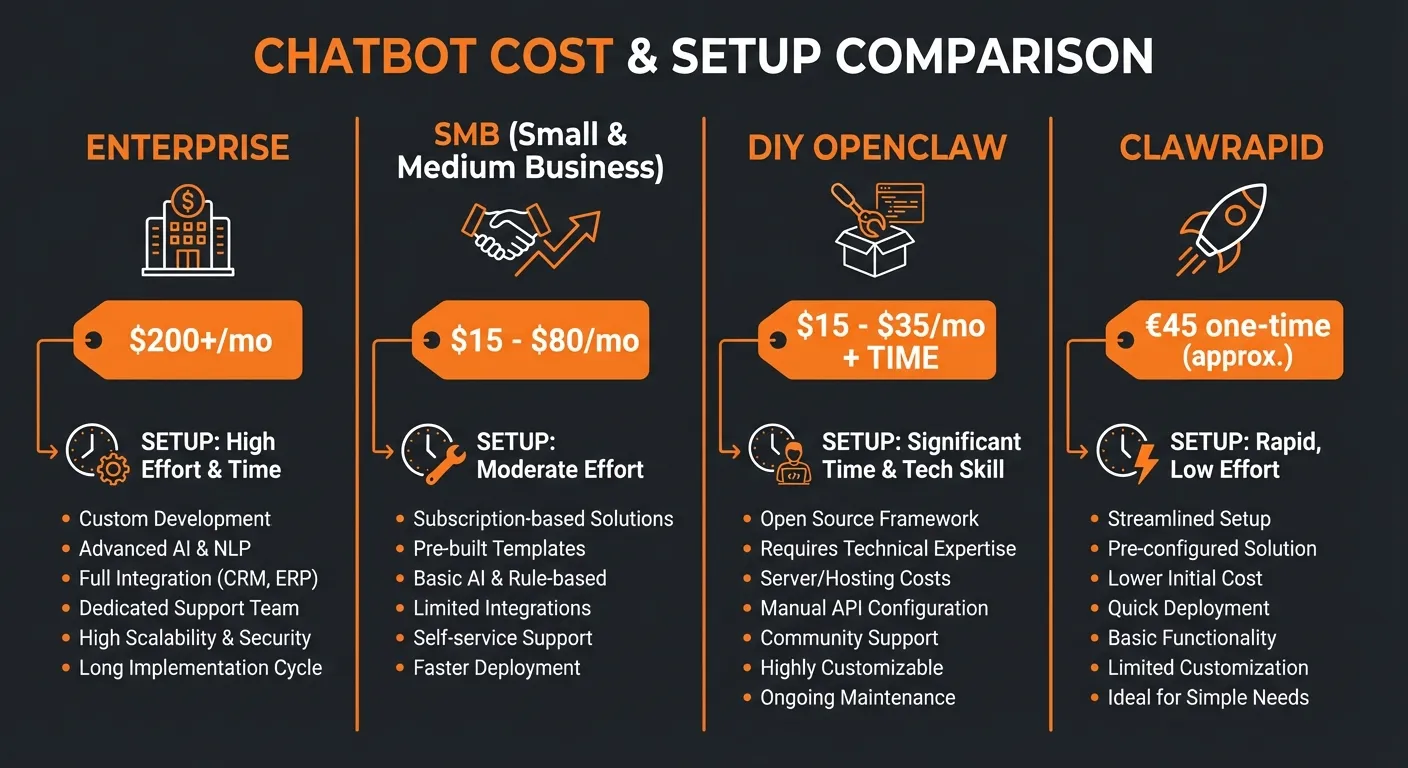
How Much Does an AI Chatbot Actually Cost?
This is the section no one else writes honestly. Here's what you'll actually pay.
Enterprise Solutions: $50–200+/seat/month
| Tool | Base Price | AI Add-ons | 5 Agents, 5K Conversations/mo |
|---|---|---|---|
| Intercom | $39/seat | ~$0.99/resolution | ~$5,000/mo |
| Zendesk | $55/agent | Included at tier | ~$3,300/mo |
| Drift | $2,500/mo | Included | $2,500+/mo |
SMB Solutions: $15–80/month
| Tool | Monthly Cost | Hidden Costs |
|---|---|---|
| Tidio + Lyro | $68/mo | Extra for more conversations |
| Manychat Pro | $15/mo | Scales with contacts |
| ClawRapid | $45/mo | None |
DIY with OpenClaw: $5–30/month (but technical)
If you're a developer, you can self-host OpenClaw for the cost of a VPS ($5–15/month) plus API calls ($10–20/month depending on usage). But you'll spend hours on setup, maintenance, and prompt tuning.
The real cost of DIY:
- VPS hosting: $5–15/month
- LLM API calls: $10–20/month
- Your time for setup: 4–8 hours
- Ongoing maintenance: 2–3 hours/month
- Total: $15–35/month + your time
Managed OpenClaw with ClawRapid: $45/month
- Zero setup time
- No maintenance
- Human support included
- Personalized for your niche
- Total: $45/month. Period.
For a solopreneur billing at $50–100/hour, the DIY route costs more when you factor in time. ClawRapid makes economic sense from day one.
How to Choose the Right Chatbot for Your Business
By Business Size
- Enterprise (50+ employees): Intercom or Zendesk for structured support at scale.
- Small business (2–50 employees): Tidio for eCommerce, Manychat for social-first businesses.
- Solopreneur / freelancer: ClawRapid for messaging-first automation without the complexity.
By Use Case
- Customer support: Intercom, Zendesk, Tidio → How to automate customer service with AI
- Lead generation: Manychat, Drift, ClawRapid → Chatbot lead generation guide
- Appointment booking: ClawRapid, Tidio → AI appointment booking: complete guide
- Internal productivity: ChatGPT, Claude, Gemini
By Channel
- Website only: Intercom, Zendesk, Tidio
- Social media (Instagram, Facebook): Manychat
- Messaging apps (Telegram, WhatsApp): ClawRapid
- Phone/Voice: Zendesk, Dialpad
AI Chatbot Trends in 2026
The chatbot space is evolving fast. Here are the trends shaping the rest of 2026 - and why they matter for your buying decision.
Agentic AI: Bots That Do Things
The biggest shift in 2026 is the move from chatbots that answer to AI agents that act. Instead of just telling a customer "you can reschedule on our website," an agentic bot checks the calendar, finds available slots, reschedules the appointment, and sends a confirmation - all in one conversation. Tools like Intercom Fin, ClawRapid, and OpenClaw are already building these action-oriented workflows with function calling and tool use.
Messaging-First: Goodbye Website Widgets
The traditional website chat bubble is losing ground. Consumers - especially in Europe, Latin America, and Asia - already live on WhatsApp, Telegram, and Instagram DMs. Businesses are following them there. Expect more chatbot platforms to launch native messaging integrations and fewer to invest in website-only widgets. ClawRapid and Manychat are ahead of this curve.
Open-Source AI Assistants
The open-source movement is catching up. Frameworks like OpenClaw let businesses own their AI stack: no vendor lock-in, full data control, and the ability to customize every behavior. For businesses with technical teams, self-hosting is becoming a real alternative to SaaS platforms. For everyone else, managed services like ClawRapid bridge the gap.
Voice AI
Voice-based AI assistants are still early, but watch this space. Companies like Dialpad and Bland.ai are building AI agents that handle phone calls - taking orders, answering FAQs, and qualifying leads by voice. By late 2026, expect voice AI to merge with chat-based bots into unified conversational platforms.
For a deeper dive, read our AI automation trends for 2026.
FAQ
What is the best AI chatbot for small business?
For small businesses, it depends on your channel. Tidio is excellent for eCommerce stores, Manychat works great for social media-driven businesses, and ClawRapid is the best option for service businesses that want an AI assistant on Telegram or WhatsApp without any technical setup. All three are under $50/month.
Can AI chatbots really replace customer service?
Not entirely - but they can handle 60-80% of routine inquiries. Intercom reports that their Fin AI agent resolves up to 70% of tier-one tickets. For solopreneurs, an AI chatbot can handle 100% of after-hours inquiries, which is often the difference between losing and keeping a lead.
How much does an AI chatbot cost per month?
It ranges wildly. Enterprise solutions like Intercom and Zendesk run $39–$200+/seat/month. SMB tools like Tidio and Manychat start at $15–$68/month. ClawRapid offers flat pricing at $45/month with no per-message or per-seat fees. DIY with open-source tools like OpenClaw costs $15–35/month but requires technical skills.
What's the difference between a chatbot and an AI assistant?
A traditional chatbot follows scripted rules (if user says X, respond Y). An AI assistant uses large language models (LLMs) to understand context, generate natural responses, and handle complex multi-turn conversations. In 2026, most modern "chatbots" are actually AI assistants - including tools like ClawRapid, Intercom Fin, and Tidio Lyro.
What is OpenClaw and why does it matter?
OpenClaw is an open-source AI assistant framework that gained massive traction in early 2026. It lets developers deploy customizable AI assistants on messaging platforms like Telegram. For non-technical users, managed services like ClawRapid make OpenClaw accessible without any coding.
Can I use an AI chatbot on Telegram or WhatsApp for my business?
Yes. While most chatbot platforms focus on website widgets, ClawRapid deploys your AI assistant directly on Telegram (with WhatsApp coming soon). This is increasingly important: 75% of consumers prefer messaging a business over calling or emailing.
Is OpenClaw free?
Yes - OpenClaw is fully open-source and free to use. However, self-hosting requires technical skills: you'll need to set up a server, configure APIs, and maintain the system yourself. If you want the power of OpenClaw without the technical overhead, ClawRapid is the managed version - it handles hosting, updates, and support for $45/month.
What's the best AI chatbot for coaches and freelancers?
For coaches and freelancers who get leads through messaging apps, ClawRapid is the best fit - it deploys on Telegram in 60 seconds and handles FAQ, lead qualification, and appointment booking out of the box. If your business is more eCommerce-oriented (selling courses, digital products), Tidio with Lyro AI is a strong alternative for website-based sales.
Bottom Line
The AI chatbot landscape in 2026 is split into two worlds:
- Enterprise tools (Intercom, Zendesk, Drift) that are powerful but expensive and complex.
- Messaging-first tools (ClawRapid, Manychat) that are fast, affordable, and built for how customers actually communicate today.
If you're a solopreneur, coach, freelancer, or small service business - you don't need a $200/seat enterprise platform. You need an AI assistant that lives where your customers are, answers their questions instantly, and costs less than a dinner out.
That's exactly what ClawRapid does.
🚀 Ready to deploy your AI business assistant?
Set up a personalized AI chatbot on Telegram in 60 seconds. No code. No credit card. Just your business name and niche.
Last updated: February 2026. Pricing and features are accurate as of publication date. We update this guide monthly.
Which agent do you want to deploy?
The battle-tested assistant, extensible with 16,000+ skills.
Which model do you want as default?
Low token prices with Max reasoning. You can also connect a ChatGPT subscription that includes this model.
You can switch anytime from your dashboard
Which channel do you want to use?
You can switch anytime from your dashboard
In 60 seconds, your AI agent is live.
Related articles
10 Best Customer Support Chatbots in 2026 for Live Support
A buyer-focused comparison of chatbot-first support tools for FAQ handling, intake, first-response speed, and clean human handoff across web and messaging.

OpenClaw vs ChatGPT: Self-Hosted Agent or Cloud Assistant?
Compare OpenClaw and ChatGPT for persistent automations, local tool access, setup burden, and ongoing cost before you pick a business AI workflow.
Best Hermes Agent Hosting: Self-Hosted VPS, Serverless, or Managed?
Compare the real ways to run Hermes Agent 24/7: DIY VPS, cloud VMs, serverless sandboxes, and managed hosting, with costs, security, and setup time.