
OpenClaw vs ChatGPT: Self-Hosted Agent or Cloud Assistant?
Compare OpenClaw and ChatGPT for persistent automations, local tool access, setup burden, and ongoing cost before you pick a business AI workflow.

Jean-Elie Lecuy
|Founder of ClawRapid
SaaS builder writing about OpenClaw, AI agents, and agentic coding, with one goal: make powerful tooling actually usable.
This is not really a model-quality comparison. It is a workflow comparison between two very different operating models. ChatGPT is the easier cloud workspace when you want fast answers inside a polished app. OpenClaw is the better fit when you want an agent that lives in Telegram or Slack, runs in the background, and can act on your own tools.
That difference affects setup time, cost structure, and what "automation" even means. If you are deciding between a hosted chat product and a self-run assistant with persistent access to your stack, this page is for that decision.
What Is OpenClaw?
OpenClaw is an open-source AI assistant which is one of the fastest-growing open-source projects on GitHub. You install it on your own server (a Mac Mini, a VPS, a Raspberry Pi) and it connects to your messaging apps: Telegram, WhatsApp, Slack, Discord, and more.
What makes OpenClaw different from a typical chatbot is that it's agentic. It doesn't just answer questions. It takes actions: managing files, running commands, sending emails, browsing the web, and executing custom "skills" that extend its capabilities.
It runs 24/7 in the background. It remembers everything. And it can message you proactively, not just respond when you ask.
The catch? You need to host it, configure it, and maintain it yourself. That means Docker, SSH, API keys, and regular updates.
What Is ChatGPT?
ChatGPT, built by OpenAI, is the world's most popular AI chatbot. Over 800 million people use it weekly. You open the website or app, type your question, and get an answer.
ChatGPT excels at conversation: writing, coding help, brainstorming, research, and analysis. With the Plus plan ($20/month), you get access to GPT, image generation with DALL-E, web browsing, and custom GPTs.
OpenAI recently added "Operator" mode, which lets ChatGPT perform web tasks like booking appointments or filling forms. But it still operates within OpenAI's sandboxed environment. It can't access your local files or run commands on your machine.
Close the tab, and ChatGPT stops working.
OpenClaw vs ChatGPT: Feature-by-Feature Comparison
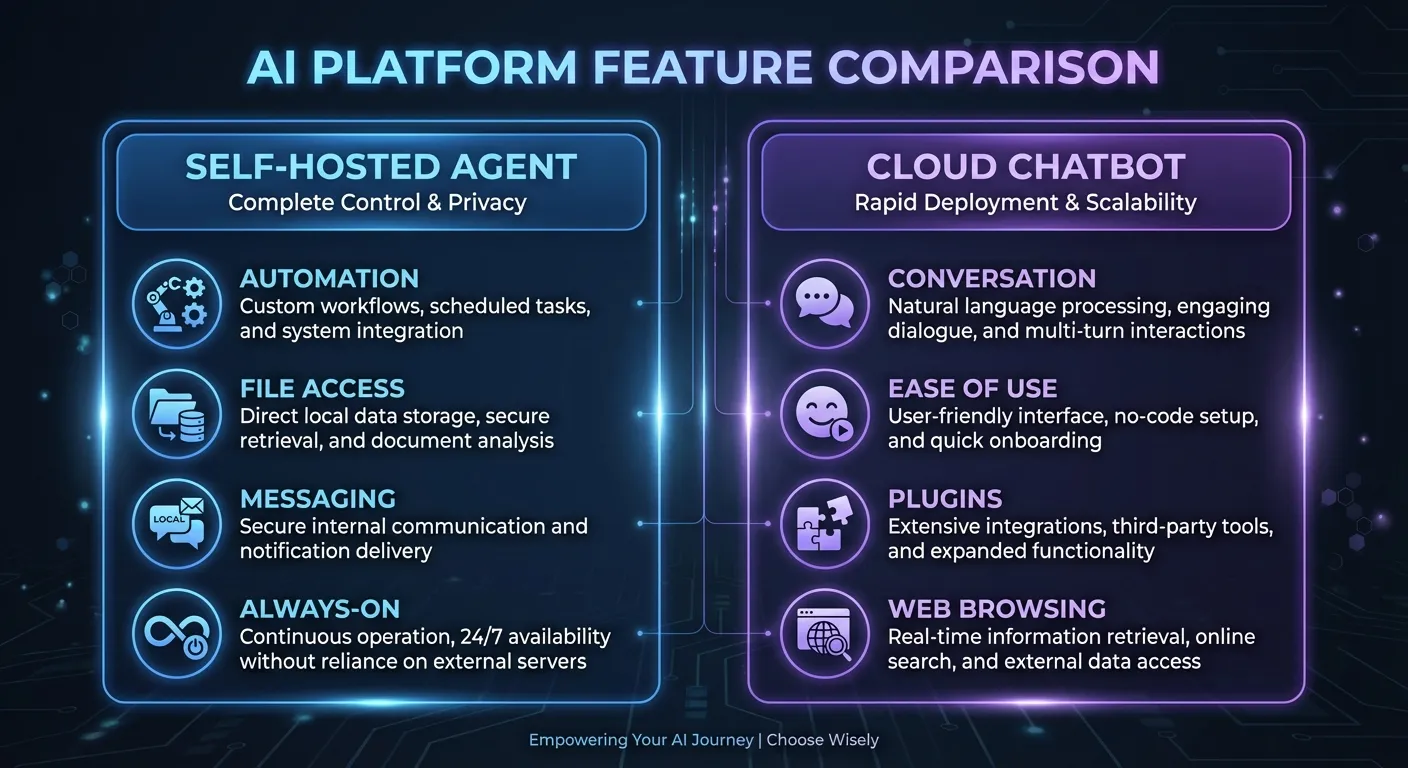
Here's where these two tools actually differ. The comparison isn't about which one is "smarter" (they can both use the same underlying AI models). It's about what they can do and how they fit into your life.
Always-On vs Session-Based
OpenClaw runs as a background daemon, 24 hours a day, 7 days a week. It can monitor your inbox at 6 AM, send you a Telegram summary before you wake up, and handle customer messages while you sleep. Its "Heartbeat" system lets it check on tasks and run automations on a schedule.
ChatGPT is session-based. When you close the browser tab or app, it stops. There's no background processing, no scheduled tasks, no proactive notifications. You have to initiate every interaction.
Winner for business automation: OpenClaw
Messaging Integration
This is OpenClaw's killer feature. It integrates natively with 22+ messaging channels: Telegram, WhatsApp, Slack, Discord, Signal, iMessage, Microsoft Teams, and more. You interact with your AI assistant in the apps you already use.
ChatGPT lives in its own app and website. No native messaging integration. You go to ChatGPT; it doesn't come to you.
Winner for accessibility: OpenClaw
Ease of Use
ChatGPT wins here, and it's not close. Sign up, open the chat, start typing. No setup, no configuration, no technical knowledge required.
OpenClaw requires installing Docker, configuring environment variables, setting up API keys, creating bot tokens, managing SSL certificates, and configuring a firewall. The initial setup takes 2 to 6 hours for someone comfortable with the command line. For non-technical users, it can take days or require hiring a developer.
Winner for simplicity: ChatGPT
AI Model Flexibility
OpenClaw is model-agnostic. You can use Claude (Anthropic), GPT (OpenAI), Gemini (Google), DeepSeek, Mistral, Llama, or any local model via Ollama. Switch models anytime. Use different models for different tasks.
ChatGPT is locked to OpenAI models. You get GPT models and reasoning models. They're excellent, but you can't swap in Claude or Gemini.
Winner for flexibility: OpenClaw
File Access and System Control
OpenClaw has full access to your local file system. It can read documents, write files, run terminal commands, manage Git repositories, and interact with any software on your server. This makes it incredibly powerful for technical workflows.
ChatGPT operates in a sandboxed environment. It can process files you upload, but it can't access your local machine. The Operator feature can browse websites, but it can't touch your file system or run local commands.
Winner for power users: OpenClaw
Memory and Context
Both tools offer persistent memory, but differently.
OpenClaw stores memory as files on your disk. You can inspect, edit, and organize them. Memory persists across weeks and months. The agent builds a detailed understanding of your preferences, projects, and relationships over time.
ChatGPT has cross-conversation memory that learns your preferences and recalls past interactions. It's improving, but it still feels session-oriented. You can't easily inspect or edit what it remembers.
Winner for long-term memory: OpenClaw
Data Privacy
OpenClaw keeps all data on your hardware. Conversations, files, and memory never leave your server (except when sent to an LLM provider for processing). You control everything.
ChatGPT sends all data to OpenAI's servers. Enterprise and Team plans offer data retention controls, but free and Plus users have limited control over how their data is used.
Winner for privacy: OpenClaw (if properly secured)
The Pricing Breakdown: What Each Actually Costs
This is where most comparisons get lazy. They quote the subscription price and call it a day. But the real cost of each tool involves more than a single line item.
ChatGPT Pricing
| Plan | Price | What You Get |
|---|---|---|
| Free | $0/month | GPT mini, limited GPT, basic features |
| Plus | $20/month | GPT, DALL-E, browsing, custom GPTs, Operator |
| Pro | $200/month | Unlimited access, o1 pro mode, extended thinking |
| Team | $25/user/month | Workspace, admin controls, higher limits |
| Enterprise | Custom | SSO, compliance, dedicated support |
For most solopreneurs, the Plus plan at $20/month covers everything. Predictable, simple, no surprises.
OpenClaw Pricing (Self-Hosted)
OpenClaw is free and open-source. But "free" is misleading. Here's what it actually costs to run:
| Cost Component | Monthly Cost |
|---|---|
| VPS server (Hetzner, DigitalOcean) | $4 to $12 |
| LLM API usage (Claude or GPT) | $15 to $50+ |
| Domain and SSL | $0 to $5 |
| Your time (setup and maintenance) | 4 to 10+ hours/month |
| Total | $20 to $70+ plus your time |
The API costs are the wildcard. A moderately active assistant (50 to 100 messages per day) can easily run $30 to $50/month in API fees. And OpenClaw's agentic nature means runaway loops can generate surprise bills of $100 or more overnight.
The Hidden Cost: Your Time
If you're a business owner billing at $50 to $150/hour, the hours you spend on server maintenance, debugging, and updates have a real cost. A conservative estimate:
- Initial setup: 4 to 8 hours ($200 to $1,200 of your time)
- Monthly maintenance: 2 to 4 hours ($100 to $600 of your time)
When you factor in time, self-hosted OpenClaw can cost $150 to $650+/month in real terms.
The Third Option: Managed OpenClaw
Services like ClawRapid offer managed OpenClaw hosting that eliminates the technical overhead. For a flat rate of $45/month, you get:
- Server hosting included
- $15/mo LLM API credit included
- Telegram and messaging integration pre-configured
- Security updates applied automatically
- Human support team
- No runaway API cost risk
For solopreneurs and small business owners, managed services often end up being the most economical option despite the higher sticker price. You skip the setup time, avoid surprise bills, and get a working assistant in 60 seconds.
Use Cases: When to Choose Each Tool
Choose ChatGPT When You Need...
A thinking partner. ChatGPT is unbeatable for brainstorming, writing drafts, analyzing documents, and working through ideas interactively. The conversation interface is polished and intuitive.
Quick one-off tasks. Need to summarize a PDF, rewrite an email, debug a code snippet, or generate an image? ChatGPT handles these instantly with zero setup.
Web research. ChatGPT's browsing capabilities let it search the web, analyze current information, and provide sourced answers. Great for market research, competitive analysis, and fact-checking.
Simplicity. If you want AI help without any technical setup, ChatGPT is the clear choice. It just works.
Choose OpenClaw When You Need...
24/7 automation. If you want an assistant that works while you sleep, monitors your inbox, handles customer messages overnight, and sends you morning briefings, OpenClaw is built for this.
Messaging-first workflow. If you live in Telegram, WhatsApp, or Slack, OpenClaw meets you where you already are. No switching between apps.
Full system access. Developers and power users who want their AI to interact with local files, run scripts, manage deployments, and integrate with their infrastructure need OpenClaw.
Data sovereignty. If you handle sensitive client data and can't send it to a third-party cloud service, OpenClaw's local-first architecture gives you full control.
Model freedom. If you want to use Claude, Gemini, or a local model instead of being locked into OpenAI, OpenClaw gives you that choice.
Choose a Managed Service (Like ClawRapid) When You Need...
OpenClaw's power without the DevOps. You want 24/7 automation, Telegram integration, and persistent memory, but you don't want to manage servers, API keys, or Docker containers.
Predictable costs. A flat monthly rate with no surprise API bills beats the unpredictable costs of self-hosting.
Customer-facing AI. If you're deploying an AI assistant to interact with your customers (answering questions, booking appointments, qualifying leads), reliability matters. Managed services offer uptime guarantees and professional support.
Speed. ClawRapid deploys a personalized AI assistant in 60 seconds. Self-hosting takes hours or days.
Pros and Cons Summary
OpenClaw (Self-Hosted)
Pros:
- Free and open-source
- Full control over data and infrastructure
- Model-agnostic (Claude, GPT, Gemini, local models)
- 24/7 operation with proactive automations
- Native messaging integration (22+ channels)
- Persistent, inspectable memory
- Huge community (massive open-source community)
Cons:
- Requires technical skills (Docker, Linux, networking)
- Setup takes hours to days
- Ongoing maintenance burden
- API costs are unpredictable
- Security is your responsibility when self-hosting
- No official support (community forums only)
ChatGPT
Pros:
- Instant setup, zero configuration
- Polished, intuitive interface
- Excellent for writing, coding, research, and brainstorming
- Predictable subscription pricing
- Mature ecosystem (plugins, GPTs, integrations)
- Professional support from OpenAI
Cons:
- Session-based (no background operation)
- No native messaging integration
- Locked to OpenAI models only
- Limited data privacy controls (data goes to OpenAI)
- No local file access or system control
- Can't run automations while you're offline
ClawRapid (Managed OpenClaw)
Pros:
- 60-second deployment
- No technical skills required
- Flat pricing ($45/month ($15 AI credit included))
- 24/7 operation with Telegram integration
- Automatic security updates
- Human support team
- No runaway API cost risk
Cons:
- Less customization than self-hosted OpenClaw
- Can't install arbitrary skills
- No SSH access to underlying infrastructure
- Currently focused on Telegram (more channels coming)
Security Comparison
Security is often overlooked in "vs" articles, but it matters, especially for business use.
ChatGPT is managed by OpenAI, one of the most well-funded AI companies in the world. They have a dedicated security team, SOC 2 compliance, and regular audits. Your data is on their servers, but those servers are professionally maintained.
OpenClaw gives you full control, which also means full responsibility. OpenClaw includes Docker-based sandboxing and tool policy controls, but self-hosting still requires careful security configuration. API keys are stored in configuration files on your server.
Self-hosted OpenClaw can be very secure, but only if you know what you're doing. For non-technical users, the security burden is a serious concern.
Managed services like ClawRapid handle security for you: isolated environments, automatic patching, credential rotation, and no exposed infrastructure.
Who Uses What? Real-World Profiles
Sarah, a fitness coach: Uses ChatGPT Plus ($20/month) to write workout plans, social media captions, and client emails. Considered OpenClaw for automated Telegram responses but couldn't handle the technical setup. Switched to ClawRapid and now has a 24/7 AI assistant answering client questions on Telegram.
Marcus, a software developer: Self-hosts OpenClaw on a Hetzner VPS. Uses it to manage his calendar, monitor GitHub repos, and run automated code reviews via Slack. Loves the control and customization. Spends about $60/month total (VPS + API).
Lena, a real estate agent: Uses ChatGPT for market analysis and listing descriptions. Wanted automated lead qualification on WhatsApp. Tried self-hosting OpenClaw, gave up after the second weekend of troubleshooting. Now evaluating managed solutions.
David, a marketing consultant: Uses both. ChatGPT for client-facing work (presentations, strategy documents). OpenClaw via ClawRapid for automated prospect follow-ups on Telegram.
The Verdict: Which One Should You Pick?
The answer depends on who you are:
If you're a developer who enjoys tinkering, wants full control, and doesn't mind ongoing maintenance: self-host OpenClaw. Budget $50 to $100/month realistically, and invest time in security hardening.
If you want the simplest AI assistant for writing, research, and one-off tasks with no setup: use ChatGPT Plus at $20/month. It's the easiest path to AI productivity.
If you're a business owner who wants 24/7 AI automation on messaging apps without becoming a system administrator: use a managed service like ClawRapid at $45/month. You get OpenClaw's power with none of the technical overhead.
If you can afford it, consider using both. ChatGPT for interactive thinking and content creation. A managed OpenClaw service for background automation and customer interactions.
They're not competitors. They're complementary tools that serve different needs.
Quick Decision Matrix
| Your Situation | Best Choice |
|---|---|
| I want to chat with AI for writing and research | ChatGPT |
| I need 24/7 automation on Telegram/WhatsApp | OpenClaw (self-hosted or managed) |
| I'm a developer who wants full control | OpenClaw (self-hosted) |
| I'm a business owner, not a tech person | ClawRapid (managed OpenClaw) |
| I want predictable monthly costs | ChatGPT Plus or ClawRapid |
| I handle sensitive client data | OpenClaw (properly secured) |
| I want the fastest setup possible | ChatGPT (instant) or ClawRapid (60 seconds) |
Frequently Asked Questions
Can OpenClaw replace ChatGPT completely?
Not really. OpenClaw excels at background automation, messaging integration, and system-level tasks. ChatGPT excels at interactive conversation, content creation, and one-off research. Most power users end up using both for different purposes rather than choosing one over the other.
Is OpenClaw really free?
The software is free and open-source (MIT license). But running it costs money: you need a server ($4 to $12/month), LLM API access ($15 to $50+/month), and time for setup and maintenance. The realistic monthly cost is $50 to $100+ when you factor everything in.
Can I use ChatGPT models inside OpenClaw?
Yes. OpenClaw supports GPT and other OpenAI models through their API. You pay OpenAI directly for API usage instead of a ChatGPT subscription. This gives you GPT's intelligence with OpenClaw's automation capabilities.
Which is better for customer service?
For a simple FAQ chatbot, ChatGPT's custom GPTs work well. For 24/7 automated customer support on messaging apps with proactive follow-ups and persistent memory, OpenClaw (or a managed service like ClawRapid) is significantly more capable.
Is OpenClaw safe to use for business?
OpenClaw can be secure, but it requires proper configuration. The default setup has known security issues (open gateway, no authentication, plaintext API keys). If you're not comfortable with server security, a managed service handles these concerns for you.
Can ChatGPT work on Telegram or WhatsApp?
Not natively. ChatGPT only works through its own app and website. There are third-party bots that bridge ChatGPT to Telegram, but they lack the deep integration and always-on capabilities that OpenClaw provides natively.
What if I don't want to choose between them?
That's actually the smart play. Use ChatGPT for interactive work (writing, brainstorming, research) and a managed OpenClaw service for background automation (customer messaging, scheduling, proactive notifications). They complement each other perfectly.
How does ClawRapid compare to self-hosting OpenClaw?
ClawRapid is built on OpenClaw's technology but handles all the infrastructure: hosting, API costs, security updates, and Telegram integration. You trade some low-level control for zero technical overhead and predictable pricing. For most non-developers, it's the fastest path to a working AI assistant. Learn more about OpenClaw hosting options.
Want OpenClaw's automation power without the technical setup? Try ClawRapid free for 7 days - deploy your AI assistant on Telegram in 60 seconds. No credit card, no Docker, no DevOps.
Which agent do you want to deploy?
The battle-tested assistant, extensible with 16,000+ skills.
Which model do you want as default?
Low token prices with Max reasoning. You can also connect a ChatGPT subscription that includes this model.
You can switch anytime from your dashboard
Which channel do you want to use?
You can switch anytime from your dashboard
In 60 seconds, your AI agent is live.
Related articles
OpenClaw vs Hermes Agent: Ecosystem or Self-Learning Agent?
Compare OpenClaw and Hermes Agent on channel reach, skill distribution, memory strategy, self-improving workflows, and deployment style.
OpenClaw vs nanobot: Bigger Platform or Lean Python Agent?
Compare OpenClaw and nanobot on Asian messaging coverage, codebase size, security model, ecosystem maturity, and production readiness.
OpenClaw vs NanoClaw: Claude-Only Minimalism vs Full Platform
Compare OpenClaw and NanoClaw on Claude-only workflows, per-session isolation, channel coverage, ecosystem depth, and how much code you want to own.